Inspect a transaction on its selected network.
Crypto Omnichain Tracker brings transaction details and available asset movements into a per-network view.
Ask about tracker accessInspect inputs and outputs
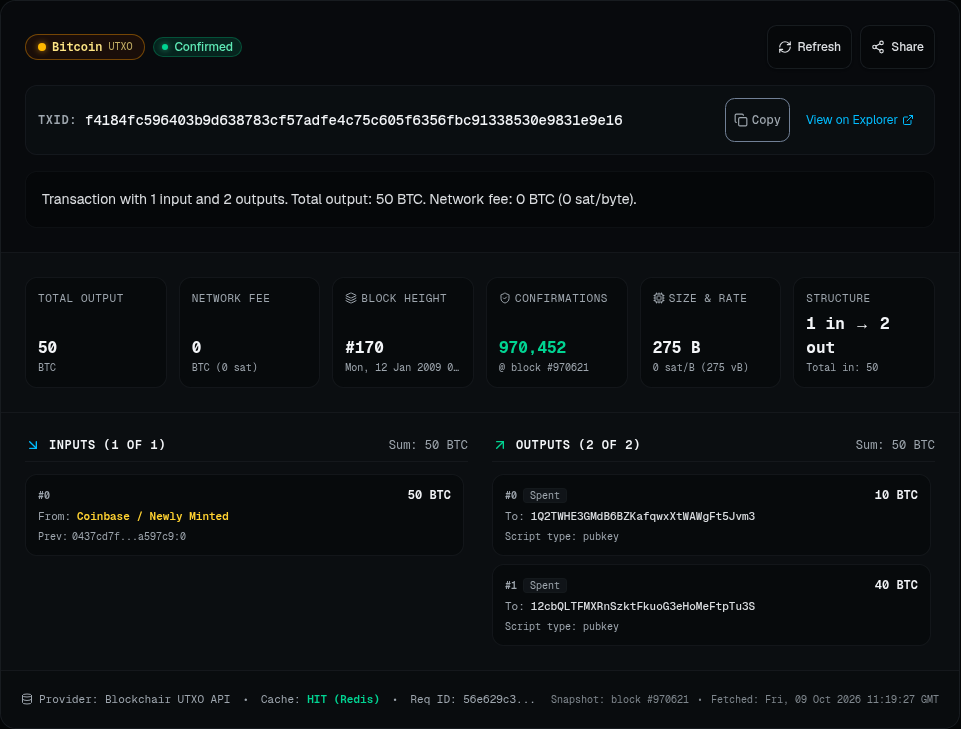
A Bitcoin result brings transaction status, available details and the UTXO ledger into the same view. Open the screenshot to inspect the original application.
A transaction, in context
Start with a network and transaction hash
Select the network before looking up a transaction. Crypto Omnichain Tracker is presented in the application as Transaction Story Explorer. Each lookup stays on its selected network; the application does not trace cross-chain journeys.
Inspect the available transaction details
For Ethereum, inspect EVM details, asset movements and decoded approvals when the data is available. For UTXO networks, examine inputs and outputs. Available fields depend on the network, transaction and provider response.
Check network context
The overview includes native coin prices, recent blocks and suggested fees from the provider. Updates depend on provider availability; results can be partial or delayed.
Revisit a search in your session
Session history lets you return to previous lookups. Retry is available when a request fails. History belongs to the current session rather than a studio user account.
Active lookup networks
- Ethereum
- Bitcoin
- Litecoin
- Dogecoin
- Bitcoin Cash
- Dash
BNB Smart Chain and Polygon remain legacy compatibility paths. They are not part of the active network selection.
Use the available details as transaction evidence. The application does not promise complete decoding or instant real-time data for every lookup.